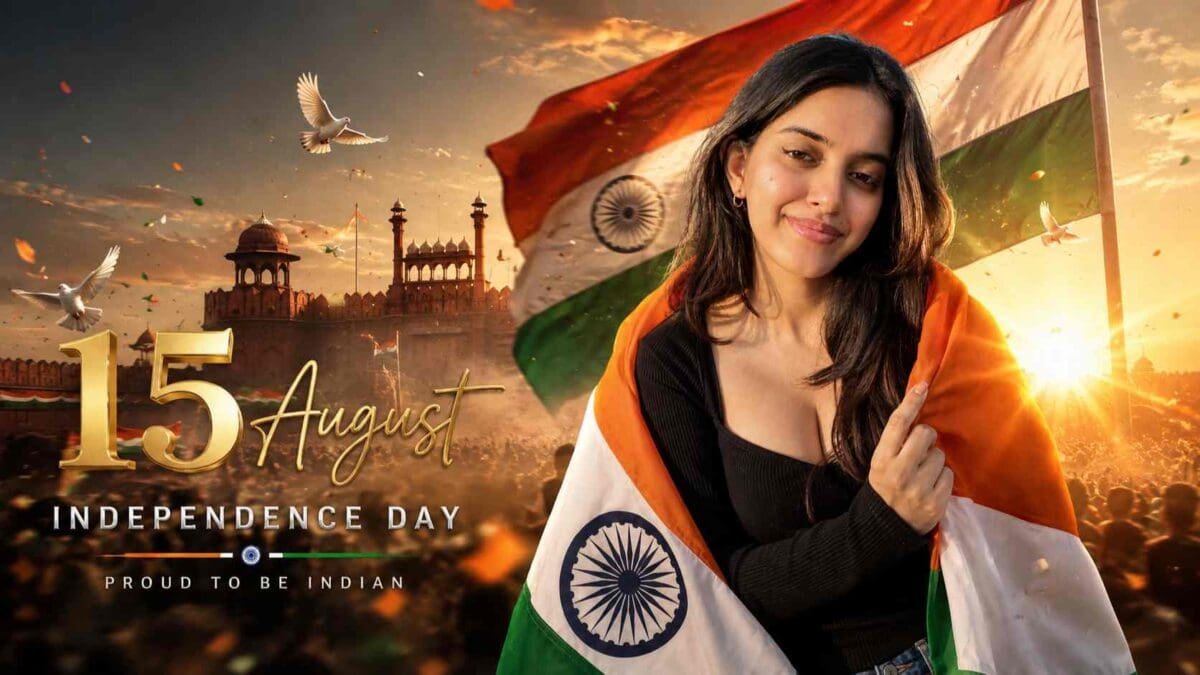
Celebrate Independence Day with Creative AI Photo Editing
Every year on 15 August, millions of Indians celebrate Independence Day by sharing patriotic photos, videos, and social media posts. Whether you’re updating your WhatsApp DP, posting an Instagram Reel, creating a YouTube thumbnail, or designing a Facebook cover, a unique Independence Day image always grabs attention.
Thanks to the rapid growth of artificial intelligence, creating professional-looking patriotic images has never been easier. With ChatGPT and AI image generation tools, you can create realistic, cinematic, and high-quality Independence Day portraits in just a few minutes. All you need is a well-written prompt and a good reference photo.
If you’re searching for the best 15 August AI Photo Editing Prompt, this article will help you understand how to create premium-quality patriotic images that look like they were captured by a professional photographer.
Why Are 15 August AI Photo Prompts So Popular?
AI-generated images have become one of the biggest trends on social media. Every Independence Day, creators, influencers, students, and photographers use AI tools to design unique patriotic portraits that stand out from ordinary photos.
Instead of spending hours editing images manually, AI can generate stunning artwork with realistic lighting, detailed backgrounds, and professional color grading. A single prompt can transform a normal photograph into a cinematic Independence Day masterpiece.
This is why thousands of users search for high-quality AI prompts before every national celebration.
What Makes a Great Independence Day AI Prompt?
A premium AI prompt includes much more than a simple description. It provides detailed instructions about the person’s appearance, pose, lighting, background, camera angle, clothing, colors, and overall mood.
For Independence Day, the best prompts usually include elements like the Indian National Flag, Red Fort-inspired architecture, tricolour smoke, golden sunlight, dramatic clouds, patriotic atmosphere, and realistic HDR lighting. These details help AI generate images that look natural, emotional, and visually impressive.
If you want your image to go viral on Instagram or Pinterest, always use detailed prompts instead of short descriptions.
ChatGPT Prompt
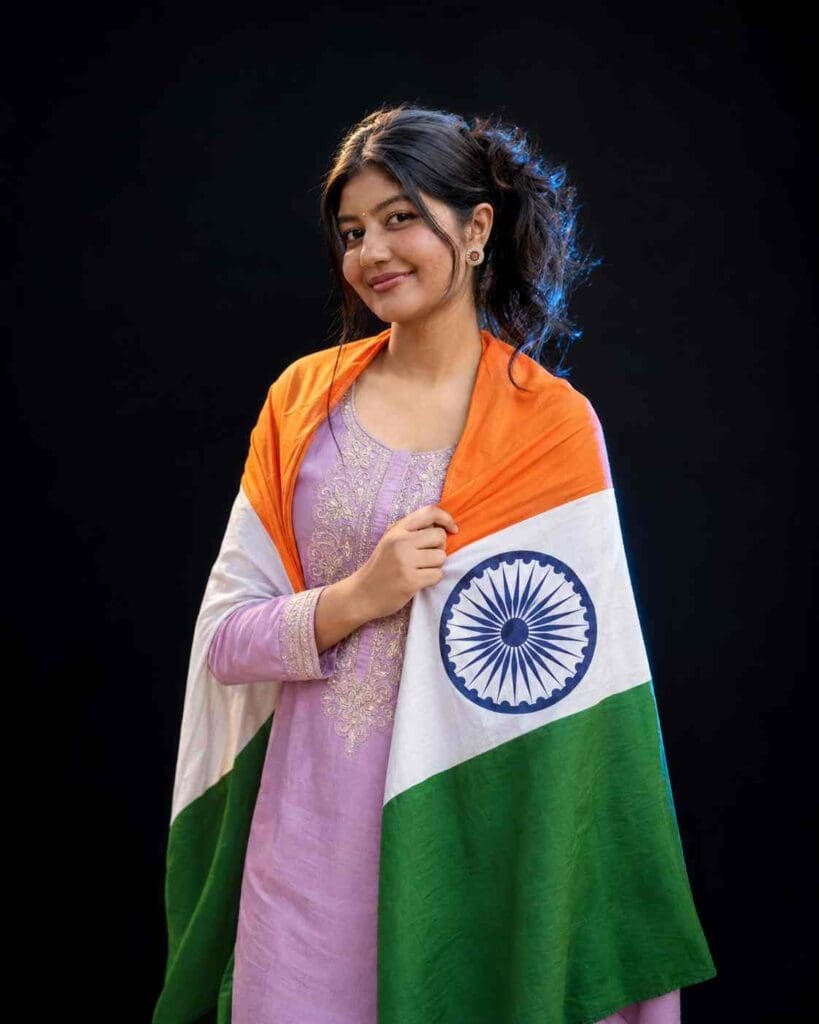
{ "version": "1.0", "title": "Indian Flag Portrait - Universal Boys & Girls", "objective": "Create an ultra-photorealistic patriotic studio portrait for either a male or female subject. Automatically follow the uploaded reference image and preserve the person's identity, gender presentation, hairstyle, clothing and accessories as closely as possible.", "input": { "reference_image": "", "reference_priority": "maximum", "identity_priority": "maximum", "outfit_priority": "maximum" }, "prompt": { "subject": { "gender": "Automatically follow the person shown in the uploaded reference image. Works for both boys and girls. Do not change gender presentation.", "identity": "Use the uploaded reference image as the ONLY identity reference. Preserve the same recognizable face, face shape, eyes, eyebrows, nose, lips, jawline, ears, hairstyle, hairline, facial hair if present, skin tone and natural facial texture. Do not beautify, reshape, masculinize, feminize, age or de-age the face.", "pose": "Create a natural elegant three-quarter standing portrait. Body slightly turned to the right, head gently looking toward the upper left, with one hand naturally holding the Indian flag near the chest.", "expression": "Keep the person's natural facial character while creating a calm, confident and proud patriotic expression." }, "clothing": { "instruction": "STRICT REFERENCE OUTFIT LOCK. Preserve exactly the clothing visible in the uploaded reference image regardless of whether the subject is male or female.", "details": "Keep the same outfit category, colors, neckline, collar, sleeve length, fabric, patterns, prints, embroidery, buttons, layers, fit and overall styling visible in the reference image. Do not redesign, replace or recolor the outfit.", "important": "Never automatically give the subject a black T-shirt, black dress, kurta, saree, salwar suit, jacket or any other clothing. Only use an item if it is actually visible in the uploaded reference image.", "accessories": "Preserve the accessories actually visible in the reference image, such as watch, earrings, jewelry, glasses or other accessories. Do not automatically add gender-specific accessories.", "outfit_accuracy": "maximum" }, "prop": { "item": "Indian National Flag", "placement": "Drape the Indian flag naturally over both shoulders while keeping the original reference outfit visible. One hand gently holds part of the flag near the chest. Use realistic fabric weight, folds and draping.", "flag_accuracy": "Accurate saffron, white and India green horizontal bands. Place a clearly recognizable navy-blue Ashoka Chakra in the white band with 24 spokes. Avoid distorted flag geometry." }, "environment": { "background": "solid premium matte black studio backdrop", "composition": "clean, minimal and distraction-free professional portrait" }, "lighting": { "style": "professional cinematic studio photography", "key_light": "warm soft key light from front-right", "rim_light": "subtle cool blue rim light from back-left", "fill_light": "soft balanced facial fill", "contrast": "high cinematic contrast while retaining natural skin details", "hdr": true }, "camera": { "camera": "Sony A1", "lens": "85mm f/1.4 GM", "aperture": "f/1.8", "iso": 100, "focus": "razor-sharp focus on the eyes and face", "depth_of_field": "natural shallow depth of field", "framing": "premium vertical Instagram portrait, approximately waist-up", "aspect_ratio": "4:5" }, "quality": { "resolution": "16K Ultra HD", "style": "hyperrealistic professional portrait photography", "skin": "natural human skin with realistic pores, fine details and subtle imperfections; no plastic smoothing", "hair": "individual realistic hair strands while preserving the reference hairstyle", "clothing": "high-detail texture matching the original reference outfit", "flag": "realistic premium fabric texture with natural folds", "photorealistic": true, "ultra_detail": true } }, "negative_prompt": [ "different person", "different face", "altered identity", "gender change", "masculinized female face", "feminized male face", "beautified face", "reshaped face", "different hairstyle", "changed hair color", "different skin tone", "different outfit", "changed clothing", "recolored clothing", "redesigned outfit", "black outfit unless visible in reference", "black t-shirt unless visible in reference", "black dress unless visible in reference", "kurta unless visible in reference", "saree unless visible in reference", "salwar suit unless visible in reference", "invented jewelry", "invented accessories", "excessive makeup", "plastic skin", "wax skin", "over-smoothed skin", "cartoon", "anime", "painting", "CGI", "low quality", "blurry", "bad anatomy", "deformed hands", "extra fingers", "missing fingers", "extra limbs", "duplicate person", "wrong flag colors", "distorted Indian flag", "distorted Ashoka Chakra", "incorrect Ashoka Chakra spokes", "watermark", "logo", "text", "noise", "compression artifacts" ], "settings": { "aspect_ratio": "4:5", "steps": 40, "cfg_scale": 6.5, "identity_strength": 0.95, "reference_strength": 0.95, "outfit_reference_strength": 1.0, "hires_fix": true, "upscale": "4x" } } (Replace this section with your own 15 August AI Photo Editing Prompt.)
Best Features of This Prompt
This prompt is designed to create premium-quality Independence Day portraits with features such as:
- Ultra-realistic face preservation
- Identity lock support
- Cinematic composition
- Indian Flag background
- Red Fort-inspired scenery
- Tricolour smoke effects
- Professional DSLR lighting
- HDR quality
- Ultra-sharp details
- Natural skin textures
- High-resolution 8K output
- Social media-ready composition
These features help create an image that looks realistic while maintaining a patriotic feel.
Where Can You Use These AI Images?
Once your image is generated, you can use it almost anywhere online. It works perfectly for:
- Instagram Posts
- Instagram Reels Cover
- Facebook Profile Picture
- WhatsApp Display Picture
- WhatsApp Status
- YouTube Thumbnail
- Pinterest Pins
- X (Twitter) Posts
- Blog Featured Images
- Digital Posters
- Greeting Cards
High-quality AI-generated images attract more engagement and increase the chances of your content being shared.
Tips for Getting Better AI Results
To achieve the best output, follow these simple tips:
- Upload a clear and high-resolution reference image.
- Use detailed prompts instead of short sentences.
- Mention realistic lighting and HDR quality.
- Keep the facial identity consistent if your AI tool supports identity preservation.
- Use cinematic camera settings like a 35mm or 50mm lens.
- Generate multiple versions before selecting the final image.
- Avoid unnecessary filters that reduce realism.
- Keep the composition clean and balanced.
Small improvements in your prompt can make a huge difference in the final result.
Why Use ChatGPT for AI Photo Prompts?
ChatGPT makes prompt writing much easier. Instead of guessing what to write, you can create detailed instructions that include camera angles, facial expressions, lighting conditions, backgrounds, textures, and artistic styles.
A well-structured prompt helps AI understand exactly what kind of image you want. This results in higher-quality images with fewer errors and better overall realism.
Whether you’re a beginner or an experienced content creator, ChatGPT can save time while improving the quality of your AI-generated artwork.
Final Thoughts
The popularity of AI-generated Independence Day images continues to grow every year. With the right ChatGPT prompt, anyone can create professional-looking patriotic portraits without advanced editing skills.
Whether you’re creating content for social media, your blog, YouTube channel, or personal profile, a detailed 15 August AI Photo Editing Prompt can help you generate realistic and eye-catching images in minutes.
Simply paste your prompt in the section above, generate your image using your preferred AI tool, and celebrate India’s Independence Day with creativity and pride.
Happy Independence Day! Jai Hind! 🇮🇳